




Checking in with Claude Code
Something in the air...
It's hard to articulate precisely what it is. Something has shifted in the last several weeks when it comes to AI tooling.
Notable figures in the community are talking differently about the tools, and some are now using them for personal and professional projects. One such example is Linus Torvalds.
It's been a while since my last check-in with AI tooling. With the start of a new year, it's a good time to see where things are at.
I was given a Claude Code Pro trial - thanks, John!
Here's what I worked on with Claude Code Pro, using the Opus model:
New projects:
- A near-live code mentor while you write code - C++, GLFW, Dear ImGui
- A text-based adventure game inspired by Colossal Cave Adventure - PHP, Laravel, Elide for Laravel/HTMX
Existing projects:
- ImGui rendering update in an existing MonoGame project
This post will briefly detail my approach, give an overview of the experience with each project, and conclude with overall thoughts.
The approach
The approach used for each project was roughly the same:
- Used the "Ralph" method, which seems to be hot right now
- Comprehensive specifications for the work
- Consensus between the agent and myself on planning, followed by writing the plan to a file, then doing the work
- "Ralph" worked sequentially through the task list, focusing only on a single task at a time
Each project has a docs/ folder, containing the following:
CONCEPT.md- overall project concept, 2-3 paragraphsHIGH-LEVEL-REQUIREMENTS.md- high level requirements, a broad pass onlyPROJECT-FEATURES.md- a very detailed feature/task list, with sub-lists and references to more information, further instructions, and crucial elements to the task at hand
Each project also had a CLAUDE.md file to support the agent's behaviour and
planning.
It goes without saying that using these tools still requires your input and development effort. For the sake of assessing Claude Code Pro, I let it do the vast majority of the work - I wanted to be mostly hands-off.
Project experience
1. Near-live code mentor
One-liner: A small app to run alongside a user's IDE. Select a folder to watch for changes in, and as code changes are made, it makes mentor/learning style suggestions and notes to help you improve the code you write.
Main stack: C++, GLFW, Dear ImGui
Initial setup: Project scaffolded with CLion from default template
Experience:
Being a totally fresh project with almost nothing provided, this one kicked off fairly smoothly. Early tasks covered topics like setting up dependencies, configuring unit tests, and scaffolding the main application structure.
It was interesting to watch Claude perform Google searches to discover how to install dependencies in a manner which suited the project (CMake, C++ version, etc).
The task list from this point defined small, focused slices of UI structure, with a good amount of supporting detail to progressively build out the UI without getting confused or bogged down. Eg, start with the main UI visual area consisting of two empty panes, implement the application menu (with no menu items), implement the status pane with placeholder content, implement an empty settings dialog, implement a folder watcher service, etc, etc...
This project was not completed. I'm familiar with C++, however I want to make sure that I also give Claude a good shake in a domain which I have significantly more experience in: PHP. I only have a short trial, so I drew a line in the sand here for this one.
The end result:
- An application which sets up a window via GLFW, and inits ImGui appropriately
- UI visual structure generally matched my requirements
- Folder watching was OK, this would need improvement
- Reasonable settings modal, had some UI issues such as overlapping text and UI options which were not in the specs
- Some aspects of the application could have been written in less code, there was a lot of unnecessary boilerplate and structure leading to overcomplication - I can see this increase token usage down the track, and also increase potential for inaccurate development
Acceptable but not great. The application was not taken very far, and I was keen to get on to the PHP adventure game.
2. Text-based adventure game
One-liner: A fairly simple website version of a game inspired by the classic Colossal Cave Adventure text adventure game. North/East/South/West style navigation, rooms, descriptions, and interactive items.
Main stack: PHP, Laravel, Elide for Laravel
Initial setup: Project scaffolded from Elide's simple starter kit, including Laravel, auth, main app views, context for how to render pages and components, etc.
Experience:
This project was scaffolded with Elide's Simple Starter Kit, which provides a fresh Laravel project, a core set of application views and templates, and some reasonable templates for how Elide/HTMX can be used to present a dynamic frontend with little-to-no JavaScript.
One of the things I was most interested in is how well tools like Claude Code can deal with proprietary code bases, legacy systems, and frameworks or patterns which are not prevalent.
The first task for Claude was to assess the project and templates, read through Elide's documentation, and document implementation details, examples, reference points, and more.
It did a reasonable job of this. I was impressed to see it note how to use
Elide's @htmxPartial(...) directives, how it should return components and
partials to the frontend, and that it discovered the toast notifications system
which was already in place, along with the middleware which makes those work.
From here, the task list was a sequence of focused slices of data or functionality topics. Each item included specifics to be delivered, made implementation suggestions, and defined rules for the work.
Out of the three projects, I spent the most time on this one. The state of things at ~60% of the task list was reasonable. By the conclusion of the task list, there was quite a bit more mess and deviation from specs.
The end result:
- Unit tests for most of the code base
- A decent data-object driven story structure
- Support for multiple stories
- The ability to define a series of interconnected rooms
- Rooms can have a number of items/objects to help decorate the world
- Collectable items, some of which can be used (eg, a key for a door)
- A simplistic puzzle mechanism, which can be implemented in the world to challenge a player and gate progression
- A UI which lists actions/items, eg: "North", "South", "Examine", "Pick up", "Drop", etc
- A small map view to help the player recognise where they are as they explore the world - this was broken and would often show the wrong location or neighbouring rooms
- Players could start, stop, and resume playing a story
- Story state and history was tracked in the database, everything else defined in data/code
As I'm much more familiar with this domain of work, I noticed quite a lot more than I did with the Code Mentor application.
Thoughts/issues:
A non-exhaustive list of some things I noted while working on this project:
- Stories registered against a global service - OK
- Puzzles registered independently against a global service - Not OK, they belong to stories and should have been contextualised there (this was spec'd)
- Enormous global lists of world items - Not OK, they were to be defined within their containing room, and could be automatically globalised from there
- Later tasks strayed from project patterns - the agent stopped using
@htmxPartial(...)s and started inlining everything in the main story template - The agent fabricated new requirements - eg: the spec only asked for north,
south, east, west, up, and down; it chose (after the movement task!) to
implement north-east, south-east, south-west, and north-west
- This flowed on to further changes and complications in room structure and puzzle mechanics
- Where existing mechanisms existed, it would create new ones which were almost the same as the existing ones
- Sometimes it would revise existing behaviours into significantly more complex and unnecessary forms
- As the project went on, I was able to achieve less and less before hitting rate limits. By the end of the project I'd be lucky to get a single task done
3. ImGui rendering update in an existing MonoGame project
One-liner: In my game project ImGui windows are "owned" by entity components and are currently rendered to the back buffer as a whole after the game is rendered. These windows should instead be rendered to their own texture targets, which will then be presented as sprites, allowing them to be more integrated in the game world, and also support sprite effects and component transforms (rotation, scale, skew, etc).
Main stack: C#, MonoGame, Nez, ImGui.NET
Initial setup: Pre-existing MonoGame+Nez project with existing scenes, entities, and components.
Experience:
I had a lot of specific hints, directions, and details for this one as I've done this task myself in the last week. The project was branched off a commit before my changes.
I was quite keen to see how Claude Code went with this one, as it's a fairly small scope with a reasonable level of complexity.
The end result did not achieve a pass mark:
- It made poor decisions which did not follow or reflect the provided specs and needed more steering/correction than the other projects
- The fundamental requirement for this task was to render ImGui windows to a texture and present them via a Sprite component - it presented them via a custom render call on the renderer's batcher, negating one of the main motivations for this change
- Rendering of the ImGui windows was done poorly - there were scale and crop issues
- Mouse input coordinate translation was wrong and done in many more lines of code than was necessary
- It implemented a whole new set of size/position tracking methods and properties for windows - this was unnecessary and not spec'd, and wasn't used in code either
- When troubleshooting a couple of the issues it created, it would spend a lot of time on one part of an issue only to negate and remove all that work on the second part of the issue because the second part also solved the first part
- While it worked through some issues, it introduced new issues
General token usage working through this task was less than working through the other projects which allowed for a bit more time to work through things.
That said, when the rate limit was reached, the end result was not a success and took about the same amount of time I spent doing it myself last week.
If you factor in time for writing the spec and preparing for the agent, it took more time.
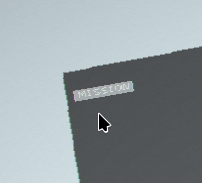 A button reflecting a hovered state when the cursor is not actually over it
Musings
My initial impression with this round is that things have come a long way, even in the last two months.
I was impressed with how Claude planned and enacted the work. Plan mode was genuinely useful in practice, and when provided with the right details and context, it does a lot more than I expected it to given my prior experiences with these sorts of tools. Using the "Ralph" approach and focusing on small slices of localised work resulted in a much better result than I've seen previously.
There's no denying how far things have come and how our processes will change. I think it remains to be seen whether it's for the better or for the worse.
Accuracy drift
Something I noticed was that as more functionality was implemented, the less accurate Claude was.
In the new projects it started off doing things almost (but not quite) how I would have done them myself.
As we got to later items in the task list, it started to "get lazy" and wouldn't follow the required patterns.
One example: In the story game project there were notifications for user actions. "You picked up the rusty key!" Rather than use the existing toast notifications, which was instructed and which it had already done previously, it decided to inline this UI into the main view and return a redirect with some session data.
To correct this, we had to remove the redirect, remove the inlined messages from the main view, and update the controller to just return the toast notification and the partials needing to be updated in the UI.
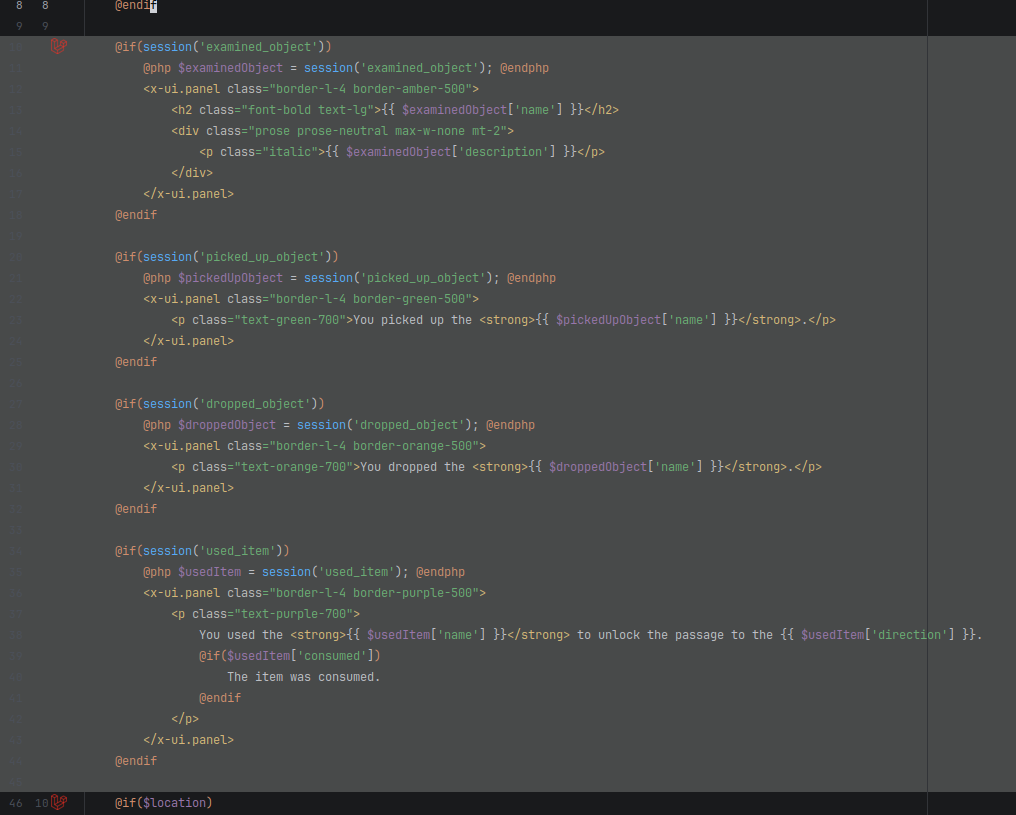 The inline message/notification view code which was removed
Steering and correction in cases like this may seem minor, though if the workflow was "full Ralph" with a lot of extra usage credits at hand, these sorts of issues could form the foundations of a really messy and tangled code base. Additionally, there would likely be a lot of work which would have to be redone or require adjustment, such as restructuring suboptimal UI layouts. Not ideal for long-running projects.
Some other (but not all) things I picked up:
- It started putting files in the wrong locations, this expanded to include other classes too as the projects went on
- It started inventing new requirements - when rate limits hit quickly, this wastes precious tokens
- It sometimes drastically overcomplicates existing simple mechanisms without there being a need to do so
Unit test issues
I had two problems with unit tests across these projects:
- If the agent made changes to code which broke tests, it would iterate on the tests over and over, making small changes to tests, or even application code, until the tests passed. A human would have been aware of the scope of original changes and changed all the necessary tests in one or two passes. This consumed a lot of tokens
- If the agent was unable to determine why a test was failing after making changes to application code, it would eventually "give up" and alter the test so that it passed, rather than properly resolve the reason for test failure
Token cost
From the beginning of this Claude Pro trial period, I was hitting the rate limits quickly.
The further into the task lists the projects got, the more quickly those rate limits would get hit due to the increase in required context.
The quicker I hit the rate limits, the less work Claude would be doing. That, combined with the time required to steer/correct the agent generally, the time saved isn't that great compared to very early steps of the projects.
You can, of course, enable overages or upgrade the plan, however...
...this isn't cheap for non-casual use
The Pro plan is AUD$30/month.
At this tier, even modest projects can hit the session rate limit after one or two real tasks. I added $5 of credit to see how far it would go; in practice that amount of credit didn't move the needle much.
The Max plan jumps up to AUD$170/month.
Established businesses can likely absorb this cost, especially if it increases their throughput of work and creates value.
For individuals and bootstrapping teams, though, that price is hard to justify.
Ignoring the quality of end results, that gap raises a question: as speed of shipping becomes a stronger competitive advantage, how can smaller teams keep up when the tools that can enable that speed are priced for companies?
Conclusion
Claude Code Pro with Opus impressed me significantly more than anything I've used previously. As with previous assessments, I still found that the deeper you get, the worse it performs.
After this week I'd be more open to using it for scaffolding and boring work, though it's still inaccurate enough for me not to trust it with important or complex work.
Cost (at least for me as a bootstrapper) is prohibitive, and even then, overall I'm not that sure it delivers high enough quality within a timeframe that would actually benefit me.
I'm also still challenged by the notion of handing off the thing I enjoy the most - actually designing and writing code. That's not something I want.